Wednesday, May 6, 2015

Film Viewing

View each of the films with your group.  Look at the STORY.  How are the elements of design used in the film?   Take notes of what techniques you want to incorporate into your film.

Story - “Spoken Documentary” – 2:10
How is it told? (Tone/Style) – TONE: “Environmental Media Project” – 2:56
STYLE: “Winter 2010 Kelly Tsai Interview” – 4:49 (clips)
 “Getting Grown with Aaron Greer” – 2:02                            
“Building Futures Spring 2011” – 6:02
“Building Futures Spring 2011” – 1:54


Wednesday, March 18, 2015

Cinemagraph

Go online and define search what a Cinemagraph is.  In your own words, explain what it is.

Go to the following websites and choose 6 Cinemagraphs that you like.  For each Cinemagraph, answer the following questions:

http://www.hongkiat.com/blog/cinemagraph/
http://www.tripwiremagazine.com/2011/07/cinemagraphs.html
http://www.bypeople.com/cinemagraphs/

1)  Title/ Description of Cinemagraph.
2)  What do you like about the Cinemagraph?
3)  What would you change?


Friday, January 23, 2015

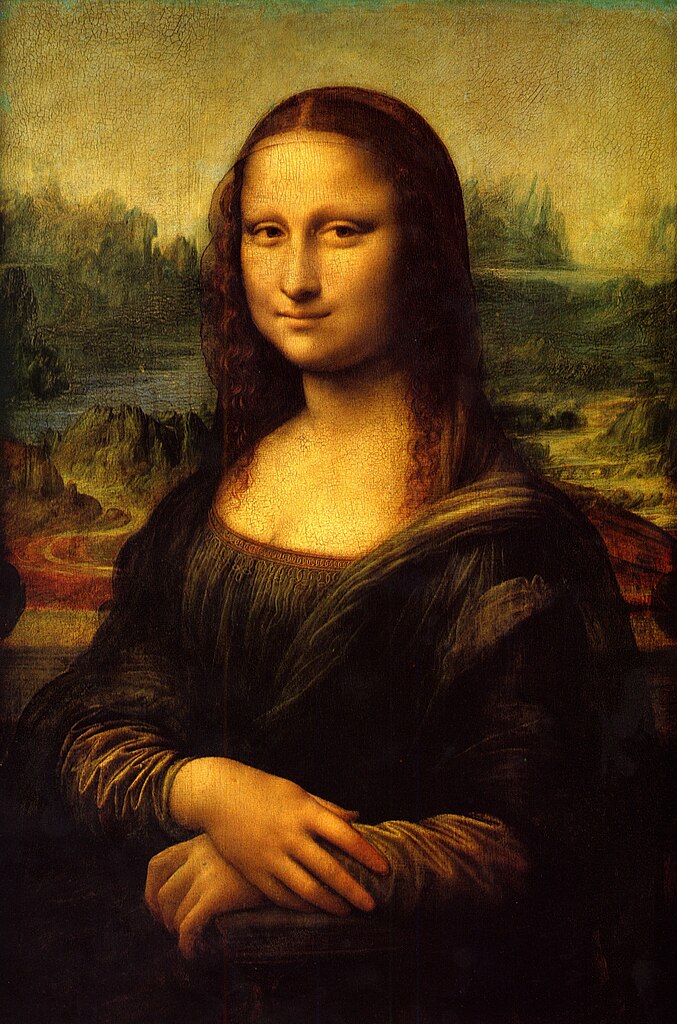
Sub Plans Jan 23- Blinking Mona Lisa


Learn how to create bliking or winking eyes!


Step 1
Grab a beautiful portrait of Mona Lisa.  Click on the link below and save this image onto your desktop.  Then import the image into Adobe Photoshop.

Step 2
Drag the "Background" over the layer icon to duplictate the background.


Step 3
Select the "Background Copy" and enter Filter > Liquidify or (shift+ctrl+x).

Then select the Freeze Mask Tool (F)


Step 4
With the Freeze Mask tool, carefully go around the eyes.

Use Thaw Mask Tool if you made any mistakes.
- Leave a little gap between the eye brows and the eyes for Warp tool.

Step 5
Select Forward Warp Tool (W), and gently push down the eyes as shown.

- If you want winking, just push down one eye.


Step 6
Press OK and escape the Liquidfy filter.

Use the Dodge Tool (O) for finishing touch.


Step 7 Go back to Filter > Liquidify and use Forward Warp Tool as shown.
- This is to give natural looks when the picture blinks.


Left should be your original "Background", and "Background copy" at right.

Step 8 Go to Window > Animation to make GIF animation.


Step 9
Click "Duplicates selected frames" and turn the visibility off as shown.


Step 10 Duplicate another frame and this time turn the visibility on.

Also set the delay time to 0.5 seconds.


Step 11
Go to File > Save for Web & Devices and press save.

(make sure the preset is GIF)


And you are done!

Tuesday, January 20, 2015

January 20th

Today's class work:

1)  Upload PDF copy of your My Life Matters Image with your description underneath.

2)  Watch examples of claymation movies.  Pick 5 that you like most.  Reflect on each video (what did you like about the movie, what type of movie was it, angles, lighting, message, etc).  Number each reflection and copy the link to the videos.

Click on the link below:
http://webneel.com/25-best-stop-motion-short-films-and-claymation-videos-you-inspiration

Friday, December 12, 2014

Research


Mike Brown
1)  Who, What, Where, When, and Why?
2)  Research on each person personal life- His Life Matters!
3)  How does the media portray the     

Eric Garner

1)  Who, What, Where, When, and Why?
2)  Research on each person personal life- His Life Matters!
3)  How does the media portray the     
Andy Lopez

1)  Who, What, Where, When, and Why?
2)  Research on each person personal life- His Life Matters!
3)  How does the media portray the     

Alex Nieto

1)  Who, What, Where, When, and Why?
2)  Research on each person personal life- His Life Matters!
3)  How does the media portray the     
Oscar Grant                 

1)  Who, What, Where, When, and Why?
2)  Research on each person personal life- His Life Matters!
3)  How does the media portray the     

Trayvon Martin
1)  Who, What, Where, When, and Why?
2)  Research on each person personal life- His Life Matters!
3)  How does the media portray the     

Wednesday, November 5, 2014

Friday, October 31, 2014

Substitute Assignment October 31, 2014

1)  Click on the link below and view the Motion/Kinetic Typography examples. 
*Pick three that you liked  and copy and paste the all three links to your blog (Assignment #10- Motion/kinetic typography). 
* Under each link, reflect on why you liked that specific work, what are some ideas that inspired you about that work that you would like to do with you own motion typography project? 


http://www.designyourway.net/blog/inspiration/some-of-the-best-kinetic-typography-examples/


2)  Complete the video story board on how you envision each letter of your quote to move along the frame.  Think about the layout and design of the text.
.